| -rw-r--r-- | examples/llil_parser/README.md | 63 |
diff --git a/examples/llil_parser/README.md b/examples/llil_parser/README.md new file mode 100644 index 00000000..07532c79 --- /dev/null +++ b/examples/llil_parser/README.md @@ -0,0 +1,63 @@ +LLIL Parser - Binary Ninja C++ API Sample +=== + +> Robert Yates | 22nd June 2017 + +LLIL Parser is a simple example for demonstrating how to use the BinaryNinja C++ API + +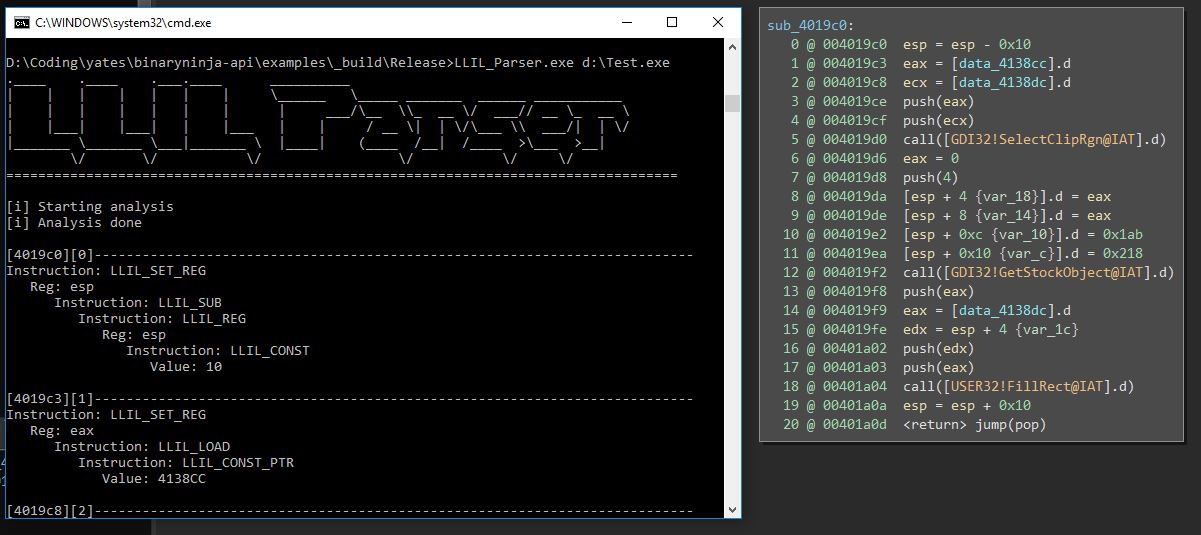 + +Example of building under windows from scratch +=== + +* https://cmake.org/ Required for this example +* We will be using Visual Studio 2017 however if want to use a different version simply run the `cmake -G` command to find the alternative name to use in the cmake commands below, be sure to use the Win64 version. + +Note: if you havent installed binary ninja into a default location then you will need to edit the cmake file and also the `std::string get_plugins_directory()` function in the `.cpp` file + +# Building the BinaryNinja API +``` +git clone https://github.com/Vector35/binaryninja-api.git +cd binaryninja +mkdir _build +cd _build +cmake .. -G "Visual Studio 15 2017 Win64" +cmake --build . --config Release +``` + +The objective here is to build the `binaryninjaapi.lib` This will be placed in the `bin` folder + +# Building the C++ Example + +``` +cd ../examples +mkdir _build +cd _build +cmake ../llil_parser -G "Visual Studio 15 2017 Win64" +cmake --build . --config Release +cd Release +copy "c:\Program Files\Vector35\BinaryNinja\binaryninjacore.dll" . +``` + +If you get an error about `BINJA_API_LIBRARY` check the API has built properly and `binaryninjaapi.lib` is located in the `bin` folder in the root folder of the API + +If you get an error about `BINJA_CORE_LIBRARY` then the file C:\Program Files\Vector35\BinaryNinja\binaryninjacore.lib is missing see [Create .lib file from .dll](https://adrianhenke.wordpress.com/2008/12/05/create-lib-file-from-dll/) on details about how to create this lib file from the dll file located in that directory + +> Building under the linux is almost exactly the same however you need not use the `-G` parameter and you build with the `make` command instead of `cmake --build` another important note is that i had to execute `cp ~/binaryninja/libbinaryninjacore.so.1 ~/binaryninja/libbinaryninjacore.so` before linking would work + +Note i do not have access to a MAC so i havent tested this. + +Using the example +=== + +Simply run the compiled executable with a target binary as a parameter and it will parse the LLIL from the first detected function in the target binary. + +The `void LlilParser::analysisInstruction(const BNLowLevelILInstruction& insn)` function is probably the most +function of interest for learning. + +This example is only intended for learning from the source code however if you wish to turn it into something more useful then you could add callbacks in the analysis function to keep track of when certain regs, values occur etc. + +# Disclaimer + +This was mostly figured out by myself and may not be the best way to achieve the intended desire, however i hope it serves as a starting point + |